Wider Than the Window
Category: SDL Adventure Game
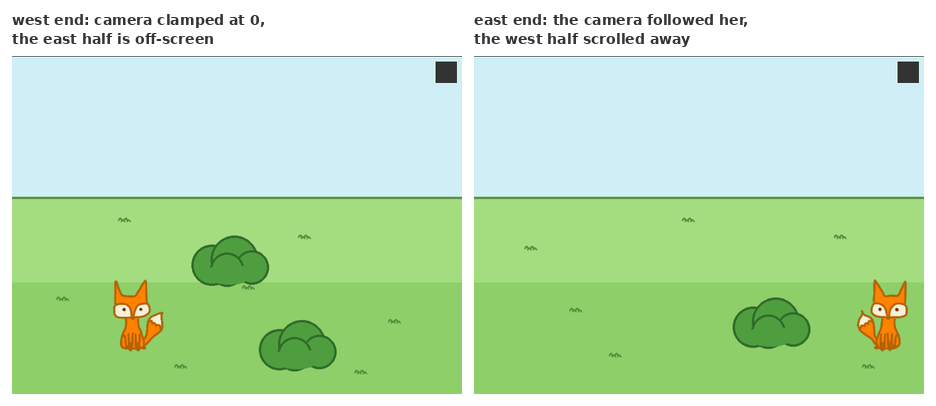
Every scene in VaniaVolpe has been exactly one screen: 800×600, the whole world visible at once. That assumption was everywhere and nowhere — no line of code said “scene equals screen,” but positions, hotspots, clicks, the walk grid and the renderer all quietly agreed on it. This post is about taking it apart: scenes larger than the window, a camera that follows the fox, and the rule that made the change tractable — scene code never does camera math.
Two coordinate systems, one rule
The depth plan (DEPTH_AND_CAMERA.md) splits the world into scene
coordinates — the pixel space of a scene’s world, as big as the scene wants
— and screen coordinates, the fixed 800×600 the player sees. The camera is
just the top-left corner of the visible window, in scene coordinates, clamped
to the scene’s bounds. Everything a scene authors — hotspots, points of
interest, prop baselines, walk rectangles,
depth bands —
stays in scene coordinates.
The rule that kept this from becoming a rewrite: conversions happen in exactly two places, both inside the engine, and scene code contains no camera math at all. A scrolling scene declares its camera in one line and authors everything else as if the window were as wide as its world:
1
2
3
4
static const SDL_Point SCENE_SIZE = {1600, 600};
static Camera camera;
// in init():  camera_init(&camera, SCENE_SIZE, fox);
// in the Scene struct:  .camera = &camera,
Scenes without a camera — every scene of both real adventures — are exactly
as before: their camera pointer is NULL and both conversions are no-ops.
The two conversion points
Input converts on the way in. After the engine checks its own screen-space
UI (the back-to-hub button), a scrolling scene’s mouse events get the camera
offset added in place — event->motion.x += (int)cam->pos.x and likewise
for clicks — before the scene ever sees them. Every existing
SDL_PointInRect hit-test, every POI walk, every cached mouse position
downstream is suddenly operating in scene coordinates without knowing it.
Even the debug overlay’s rect picker now prints scene-coordinate rectangles,
which is exactly what you want when authoring hotspots for a wide scene.
Rendering converts on the way out. render_image and render_animation
gained a module-level offset, set by the engine to the negated camera
position before the scene’s render pass and reset to zero for screen-space
UI. Scenes keep calling the same functions with the same scene-coordinate
positions; the shift happens underneath. The offset is cast to integer
once per frame and the input conversion uses the same cast, so what you
click and what you see can never disagree by a fraction of a pixel — and
images can’t jitter against each other while the camera eases.
One wrinkle the plan missed: the debug overlay draws raw SDL rectangles, not images, so the image-level offset doesn’t touch it. It now asks the renderer for the current offset and applies it to its scene-space drawing — walk-grid shading, hotspots, POIs — while its screen-space chrome (the corner markers) stays put. The happy consequence: the walk-mask paint mode works across a whole scrolling scene. Walk the fox to the far end, the camera brings the far ground into view, and you paint it.
The camera itself
The camera’s whole job fits in a page: centre the view on the actor it follows, clamp to the scene, and ease. The easing is one line of exponential smoothing:
1
pos += (target - pos) * min(1, CAMERA_SMOOTHING * delta_time);
The min(1, …) guard is doing real work: on a long frame — the web build
tabbed out and back, say — a naive rate * dt overshoots the target and the
camera rubber-bands. Clamped at 1, the worst case is landing exactly on
target. When a scene becomes active the camera snaps instead of easing (you
don’t want to watch it pan from wherever it was last week), and vertical
scrolling falls out of the same math for free — a scene of window height just
clamps y to zero forever.
The walk grid grows up
The walkability grid was sized to the window: 80×60 cells, hard-coded. It is now sized to the scene — up to 240×120 cells for the largest scene the engine allows — and every algorithm on top of it (BFS nearest, A, smoothing) was already written against grid dimensions, so none of them changed. The A cost array widened to 32 bits, because a worst-case path across a 240×120 grid can overflow 16.
The satisfying part was the .walk mask format needing nothing. When the
paint editor
shipped, its file header — walk 80 60 — recorded dimensions that could only
ever be 80 and 60, a deliberate bit of planning ahead from this very spec.
Now the header is load-bearing: masks are self-describing, the parser reads
whatever size the file declares, and loading checks it against the scene it’s
for. Old masks stay valid byte-for-byte; the format never migrated.
Proof, in the demo field
The demo adventure doubled in width: a 1600×600 field, three bushes, the same two depth bands, and one new line — the camera. Click near the screen’s edge and the fox walks toward ground that isn’t visible yet; the camera eases after her and the far half of the field scrolls in. Hotspot-free by design, it is still the reference implementation: everything in it is authored in scene coordinates, and the only camera-aware line is the declaration.
The unit suite grew a camera section — snap centring, clamping at all four scene corners, monotone convergence with no overshoot, the huge-frame guard, the screen→scene transform, and a synthetic walk across a wide scene with the camera tracking and clamping — plus wide-grid coverage for the walk layer. The scripted playthroughs of both real adventures pass untouched, which is the point: for them, this feature doesn’t exist.
What’s left of the depth plan is the last and most visible slice: parallax planes — backgrounds and foregrounds scrolling at their own speeds, and the first real scrolling scene with art to match. The window, meanwhile, is no longer the world; it’s just where you’re looking.